


|



 |
 |
Our Fantastico script installer will do all the heavy lifting
for you if your ready for your first blog, just pick the script
that you would like to use and follow the 3 to 4 screen prompts
and your ready to start blogging (well almost ;-) I'm a new member now what do I do?First off take a deep breath and relax you made the right choice ;-) You should have already received an e-mail telling you what to change your domains DNS information to. My DNwhat you say? DNS stands for Domain Name Server which is the equivalent of a postal address for your domain name (website address) so that the postmaster such as Network Solutions, Godaddy or whoever you registered your domain name with knows where to send request for your site. If you registered through us, this has already been set for you.***Make sure that you have backed up all of your site and e-mail information before requesting any such change to your DNS information, once the change has been made it is can be difficult to get this information from your old host*** To change your DNS listing you will need to log into your Registrar and change the DNS information to point to ns1.accenthost.com & ns2.accenthost.com. Once you have made this change it will take up to 3 days before servers throughout the Internet have the updated information . CPanel - viewing your hosting accountYou'll be using CPanel to manage your e-mail accounts, site statistics, FTP accounts and more depending on the hosting package you subscribe to. Until your DNS is up to date you can log into your webspace On Accenthost.com, by using the CPanel login: Visit http://acenthost.com/cpanel and log in using your new username and password. You will use CPanel for many function within your site such as setting up e-mail accounts, FTP users, viewing site statistics and installing PHP scripts mentioned aboveLOG IN PROCEDURE visit http://yourdomain.com/cpanel, which will prompt you for a username and password that you have already chosen. If your DNS information has not propagated yet (pointed to our server) you can log in by visiting accenthost.com/cpanel and use the username and password you created during sign up. One of the most basic functions you will use CPanel for is the setup of e-mail accounts. In the illustration below you see the information listed for accounts that have been set up correctly. 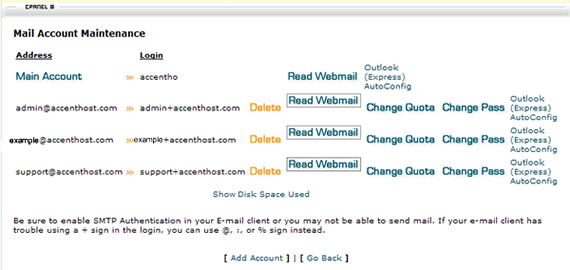 To create a new e-mail account simply click on [add account] , enter the address name and choose the quota for mailbox space. Keep in mind that e-mail quotas are counted in you hosting space, because of this we strongly recommend that you save your e-mail to your personal computer. When saving your e-mail be smart and make sure that you never download an attachment that you weren't expecting, even if it comes from someone you know. Resources to help you build sites Html Tutorials Html
With Style - basic but detailed with links to other advanced
areas on a screaming fast server!
|
 |
 |